
✆ + 1-646-235-9076 ⏱ Mon - Fri: 24h/day
Stripe Connect for Payouts: What We Learned Integrating a Multi-Vendor Flow


When you’re building a multi-vendor platform, whether it’s a marketplace, SaaS with sub-merchants, or anything in between, at some point you’ll hit The Big Question: “How do we pay these people out?”
It sounds simple. Stripe has a Connect product. There are a few options: Standard, Express, Custom. Just plug in some accounts and move the money, right?
Well… not exactly.
In theory, Stripe Connect gives you all the building blocks: onboarding flows, identity verification, split payments, transfers, and even automated tax forms. But in practice, it’s a delicate puzzle where one missing webhook handler or misconfigured transfer can stall your entire payout flow. And when you’re the platform, you’re also the one vendors will be messaging when their money doesn’t arrive.
We recently integrated a full payout pipeline using Stripe Connect with Express accounts for a platform that handles payments between end users and service providers. This article shares what worked, what didn’t, and what we wish we’d known before diving in.
Why Stripe Connect?
Given the complexity of handling third-party payouts, including compliance, fraud risk, and taxes, we evaluated several options before settling on Stripe. Traditional payment gateways either didn’t support multi-party flows, or required us to handle KYC/KYB, tax reporting, and money movement ourselves.
Stripe Connect stood out because it covers all of that and more while still giving you fine-grained control via API.
Depending on your needs, Stripe offers three types of connected accounts:
- Standard – user controls their own Stripe account via Stripe Dashboard
- Express – user sees a lightweight Stripe dashboard; you manage most of the flow
- Custom – full white-label; you own the full experience (and responsibility)
We chose Express, since it provided:
- A clean onboarding flow with Stripe-hosted UI
- Stripe-handled identity verification (KYC/KYB)
- Access to balance and payout info via API
- Just enough control – without the legal headache of fully custom payouts
And it all came with:
- Automatic tax form generation (like 1099s or EU equivalents)
- Built-in support for multiple countries and currencies
- Webhooks for real-time status updates
It sounded perfect on paper. But once we moved from docs to dev – reality hit.
The Architecture We Went With
We went with a platform-managed payout flow using Stripe Express accounts. That meant each vendor needed their own Stripe account (created via our onboarding link), and we as the platform, acted as the middle layer that controlled the payment, fee deduction, transfer, and payout logic.
Here’s what the money flow looked like for a typical transaction:
- Customer pays on the platform (via Stripe Checkout or PaymentIntent)
- Platform receives the full amount
- We use the Stripe API to transfer the vendor’s share to their connected account
- Stripe automatically pays out the vendor based on their payout schedule
This approach gave us flexibility to:
- Set platform fees per vendor
- Control payout timing (immediate or delayed)
- Support refunds and disputes properly
- Stay compliant without holding funds directly
And yes – this also made it easier to introduce tiered commissions, minimum fee enforcement, or even promotions and discounts that only affect the platform’s cut.
We built the core integration with:
- Stripe Connect API (for account creation and transfers)
- Stripe Webhooks (for tracking events like payout.paid, transfer.failed, etc.)
- Our internal logic to handle business rules (commission logic, refunds, fallback flows)
It worked — but not without its surprises.
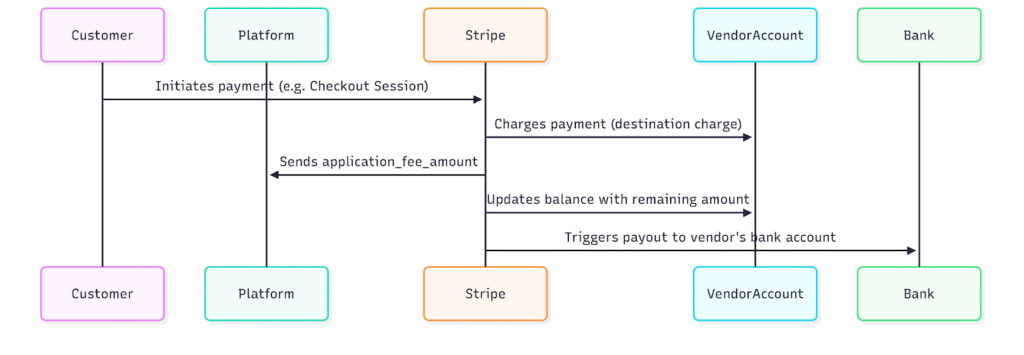
Sequence diagram of integration with Stripe Connect.
Hidden Pitfalls We Hit Along the Way
Even though Stripe’s documentation is solid, there were plenty of gotchas we didn’t anticipate. Here are the ones that caused the most friction.
1. You can’t skip vendor onboarding – not even in staging
Stripe doesn’t let you fully simulate the payout flow without completing onboarding for a connected account. That means uploading ID documents, bank details, sometimes tax numbers, even in test mode.
When testing, we kept running into “incomplete account” errors while trying to create transfers or payouts. The solution? Use Stripe’s test onboarding flow as if you’re a real vendor, filling out every required step.
Lesson learned:
Treat test onboarding as production. Build your own checklist for QA and onboarding testing. Don’t assume anything will “just work later.”
2. Failed payouts = your problem now
When a payout fails – wrong bank info, compliance issue, country restrictions – it doesn’t disappear quietly. Stripe logs it, but unless you’re monitoring payout. Failed webhooks and reacting to them, your vendor may never know.
Stripe won’t auto-retry indefinitely. And if a vendor’s account stays blocked, you’ll have to nudge them – manually.
Lesson learned:
Set up robust monitoring for all payout-related events. Build fallback logic: notify vendors, block new transfers until issues are resolved, and alert support.
3. Multi-currency ≠ multi-easy
If your customers and vendors use different currencies, Stripe won’t always convert funds how you expect. Some countries have strict rules (e.g., local currency required), and some banks charge extra for receiving in USD or EUR.
Worse some connected accounts won’t accept transfers in certain currencies, which breaks the flow unless you build extra logic.
Lesson learned:
Normalize your payout currency policy early. Keep a country-to-currency mapping. And don’t assume everyone wants USD.
4. Webhook hell is real
Stripe Connect relies heavily on webhooks. One successful transaction might fire 5–10 different events: from payment_intent.succeeded to payout paid. If your logic depends on them, and it will you need bulletproof webhook handling.
We ran into issues where:
- Some events came out of order
- Others were missed due to temporary webhook downtime
- Debugging test webhooks was inconsistent without Stripe CLI
Lesson learned:
Use the Stripe CLI early. Log and persist every webhook event. Add retries. Test flows as if they were battle conditions – not happy path only.
5. Delayed payouts aren’t always your fault but they are your support ticket
Even if your system runs perfectly, payouts can still be delayed on Stripe’s side. Reasons include:
- Compliance reviews
- Public holidays
- Random account flags
- Stripe’s own risk engine taking a closer look
To your vendors, though, the delay is your fault. They don’t care that Stripe is the middleman – they want their money.
Lesson learned:
Set clear payout expectations from day one. Add fallback status indicators (“payout in progress”, “under review”, etc.), and give support access to Stripe Dashboard logs.
6. Refunds and disputes require reverse math
When a customer gets a refund or wins a dispute, Stripe deducts the full amount from your platform account, even if you already transferred a portion to the vendor. That means you either:
- Eat the cost
- Or claw it back from the vendor (good luck with that)
Stripe has no built-in “reverse transfer” mechanism unless you explicitly manage it.
Lesson learned:
Track transfer history for every charge. Build logic to reclaim vendor share in case of refund. Make it part of your payout delay window, or freeze payouts for recent transactions.
7. Express ≠ Custom, but users still get confused
Stripe Express gives vendors limited access via a Stripe-hosted dashboard. But users often expect:
- Full dashboards like on PayPal or Wise
- Immediate payout control
- The ability to manage multiple currencies/accounts
Spoiler: they can’t. You manage most of it through API.
Lesson learned:
Set expectations clearly in your UI. Don’t try to white-label the Stripe Express flow too much – embrace the limits, or go full Custom (and suffer the pain).
Final Thoughts
Stripe Connect is powerful – no doubt about that. It gives you the tools to build a compliant, scalable, and internationally-ready payout system. But don’t be fooled by the “plug and play” marketing.
You’re not just wiring money. You’re managing:
- Tax rules in multiple countries
- Vendors who don’t understand Stripe (and don’t want to)
- Edge cases, compliance delays, refund clawbacks, webhook chaos
- And the occasional “Where’s my payout?!” at 10 PM on a Sunday
Would we use it again?
Absolutely, but only with eyes wide open.
If your platform needs:
- Transparent money flows
- Regulatory compliance without building a bank
- API-level control over commissions and transfers
- And you’re willing to invest in proper onboarding, testing, and observability
Then Stripe Connect (especially with Express accounts) is one of the best tools out there.
Just don’t expect it to be magic. Expect it to be infrastructure.