
✆ + 1-646-235-9076 ⏱ Mon - Fri: 24h/day
Why User Experience (UX) is Critical in IoT Mobile Apps


After a long day, you come home and the house has already taken care of you, the lights are dim, the thermostat has set the perfect temperature, your favorite music is playing. This is not magic, it is an IoT network of smart devices that talk to each other and to us over the internet. Today IoT is everywhere, from smartwatches and voice assistants to smart homes and even entire cities.
Adding sensors and gadgets is not enough to make life better. The key is user experience. How clearly and easily people interact with smart devices through a mobile app decides whether these technologies become truly useful and mainstream. In this article we look at UX problems and challenges in IoT apps, we discuss solutions and their impact, and we share examples that work. You will see why good UX is not a nice extra, it is essential for smart homes and beyond.
UX challenges in IoT
IoT promises more comfort and efficiency, yet several barriers slow real adoption, especially around user experience. The catalog of smart devices grows fast, mass market smart homes still roll out slower than expected. The core issues are clear, not enough simplicity, weak interoperability, security worries, and unclear value.
- Ease of use and setup. Many products are hard to install and manage. People expect technology to reduce friction, not add new chores. If pairing is confusing or daily control feels heavy, frustration follows. Surveys show that many users say smart gadgets created extra work instead of making life easier. Today one home can need several apps to control different devices, basic setup often takes long step by step flows, this pushes people away.
- Fragmentation and poor compatibility. The market looks like a patchwork of standards and closed ecosystems. Each vendor ships a separate app and often a separate protocol. A smart bulb may not talk to a speaker from another brand, a security system may refuse to integrate with the rest of the home. People end up juggling multiple services and interfaces. Every new gadget adds yet another app on the phone. There is no single control center that unifies the system. This fragmentation is not only annoying, it blocks adoption. People want a seamless experience where everything works together through one clear interface.
- Security. Security and privacy shape trust and daily use. A smart home handles sensitive data, camera video, presence signals, access to locks. News about breaches erodes confidence. Many buyers avoid smart devices because they fear tracking or hacking. If the app does not inspire trust, if data use is unclear or privacy settings are hard to find, engagement drops. UX must make safety visible and simple, clear encryption state, strong authentication, timely updates, readable controls.
- Unclear value. Even when the tech works, people need a reason to care. Many still do not buy smart devices because they do not see enough benefit. Outside of early adopters, smart lights or plugs can look like pricey toys. UX often fails to highlight concrete gains, energy savings, safety, comfort. If screens are crowded with secondary stats, users miss the main point. Design should show value in plain terms, real problems solved. Forgot to turn off the iron, a smart plug cuts power. Worried about your home while on a trip, cameras and motion sensors send alerts. When value is obvious and interactions are easy, even cautious users say yes.
Weak UX can quietly kill advanced technology. If an IoT app is confusing, unreliable, or vague about benefits, people will abandon it and the smart features will sit unused. A thoughtful, human centered UX removes these barriers and opens the path to broad IoT adoption.
How UX design makes IoT useful and easy
The issues above all have fixes. The answer is good UX practice and solid engineering. Teams worldwide have learned how to make IoT feel simple and helpful. Here are the core principles and solutions that lift the user experience in IoT apps to a new level.
- Simplify the complex with intuitive interfaces. The first rule is simplification. A smart home may run dozens of sensors, protocols, and automations behind the scenes, the interface must stay simple for the person in front of it. Good UX hides the complexity and shows a clear picture. Use minimal screens, plain copy, clean icons, logical navigation, consistent patterns. Consistency matters, when parts of the system behave the same way, people learn faster. The best mobile apps let you perform multi device actions in a few taps. Setup should feel easy too, guide new devices with a step by step flow and visual tips so even a newcomer succeeds on the first try.
- One control center and solid integration. To beat fragmentation, gather control in one place. The ideal is a single app or panel where the whole home is visible and manageable. Think of ecosystems like Apple HomeKit or Google Home, or brand platforms like GE Cync that bring bulbs, thermostats, cameras, and plugs into one interface. A clear lighting flow is one tap to pick a lamp, a simple gesture to set brightness or color. A unified UI lets people handle dozens of devices without getting lost.
- Personalization and context aware automation. The system should learn what the user needs. Use personalization and AI where it helps. A smart thermostat can learn daily routines and set temperature when you wake up or return home, no manual input required. Aim for sensible defaults that feel right most of the time, with easy manual control when wanted. The app can surface the devices and scenes you use most, for example a good night switch that turns everything off. Context matters too, use phone location to arm security when you leave or lower heating during a trip. Automation is a strength of IoT, UX should make building rules simple.
- Accessibility for everyone. Smart home products serve many kinds of people, so design for a wide range of abilities and ages. Provide multiple ways to interact, not only small on screen buttons but voice, gestures, physical buttons, and schedules. Let each person choose what works best.
- Build trust with transparent and secure UX. Trust must be part of the experience. Show security status clearly, an encrypted connection indicator, instant alerts about unusual access attempts. Give people control over data, clear privacy settings, access logs, simple ways to delete personal data. Explain security practices in plain language. Confirm critical actions with strong checks, if a door is unlocked or an alarm is disabled, ask for biometric confirmation or a prompt on the owner’s phone. These steps reduce anxiety and raise confidence. A trustworthy interface lowers resistance and helps adoption.
- Explain value and teach as you go. Onboarding and education matter. A good app introduces features gradually and shows benefits in concrete terms. After installing a smart energy meter, show the result right away, you saved 30 dollars this month. Keep help close, tips and short videos inside the app so people learn fast. Light gamification can motivate exploration, points or badges for saving energy or improving routines. Guide users from first contact to confident use, reveal the value at each step.
Technology alone does not guarantee success, what matters is how it fits people. User centered UX already tames IoT complexity and makes interactions simple, brings consistency and integration so devices feel like one system, adapts to context and needs, opens access to more people, and builds a bridge of trust between humans and smart machines.
UX as a success factor
To see how good UX drives IoT success, let’s look at real market examples. They show how smart design choices solve common problems and win loyal users worldwide.
GE Cync as a single smart home platform
General Electric makes many kinds of home appliances and lighting. When the IoT wave arrived, the challenge was clear, help people manage many devices without getting lost. The answer was a unified Cync app that supports all GE smart products. One app controls bulbs, switches, security cameras, motion sensors, thermostats, and any compatible device shows up in one interface. Most actions take one or two taps. To adjust lighting, pick a lamp from the list and drag a brightness slider or choose a color, no extra menus. If there are many devices, Cync lets you group them by room or scene and control them in bulk, one tap can turn off everything in the living room. This UX focus sets GE apart, they sell a complete smart home experience rather than a bag of separate gadgets. Users liked that it removed a major pain, a messy system with many apps. Cync keeps evolving, adding Matter support and new features. The lesson is simple, companies that bet on a unified and easy UX gain an edge in IoT because people choose solutions that promise less hassle and more control from one place.
Philips Hue. From early missteps to great lighting
Philips Hue pioneered smart lighting. Early products earned praise for light quality, yet the app drew criticism for limited scenes and clunky flows. The team listened and rebuilt the UX over several years, opened an API to third party developers, added many features while keeping the interface simple. Hue now offers intuitive control from anywhere plus smart routines. Lights can simulate sunrise in the morning, they can blink red if your stock price drops, all set up in a few taps. Philips understood they sell mood and atmosphere rather than bulbs, the app leans into that idea so people play with light without thinking about technical details. Hue is now one of the most popular smart products in the world, the reputation for a convenient and reliable experience is a big reason why.
Tesla and beyond
These UX principles extend to connected cars and smart cities. Tesla turned the car into a gadget on wheels with constant connectivity and a companion app. You can check charge, unlock the car, even summon it to the curb. Loyalty is high because the experience feels effortless, complex tasks like firmware updates or diagnostics happen in the background. Cities follow a similar path. Some offer resident apps that bundle transport, utilities, and safety. Adoption of city IoT depends on how easy these super apps feel. People will not juggle many services, everything must be consolidated and designed around human needs.
UX is where the fate of an IoT product is decided. Teams that deliver simplicity, control, and a pleasant experience become leaders in their niches. Those that ignore the user experience risk staying niche or losing trust.
Architecture and technology as the foundation of good UX
Source: Image generated via ChatGPT 5 by Volodymyr Kazakov
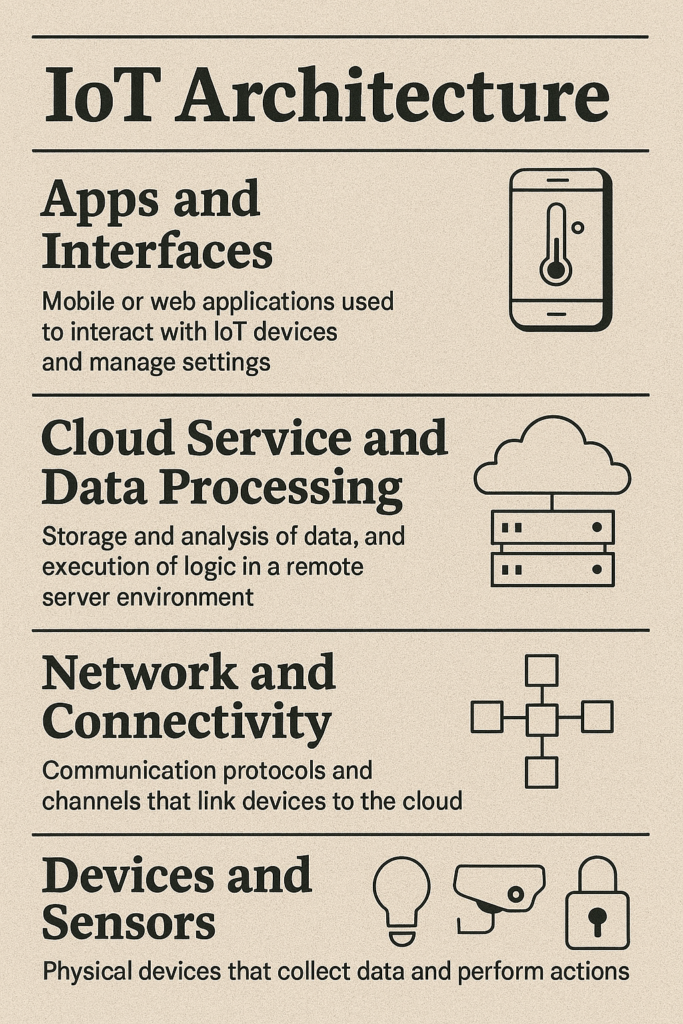
Great UX in IoT apps needs a strong technical base. The architecture of an IoT system is the skeleton and nervous system of a smart organism. It defines how devices connect, share data, and react to user actions. Engineers design it with UX in mind, speed, reliability, security, scalability, and flexibility. Here is what a typical IoT architecture includes and how it supports a solid user experience.
A layered IoT model. Classic IoT architecture is often shown as layers, each with a clear role. Key parts are below.
- Devices and sensors. These are the physical pieces at home, motion and temperature sensors, cameras, smart plugs, bulbs, locks. They collect data or perform actions. UX depends on accuracy and reliability, otherwise people see false alarms or no response. Power efficiency matters too so batteries do not become a chore. Many devices run for months or years on a battery, apps can show battery status early so people replace cells in time, that is part of good UX.
- Network and connectivity. Data must travel from a sensor to your phone. A smart home uses several wireless options, Wi-Fi, Bluetooth, Zigbee, Z-Wave, Thread, cellular. Each one fits a job. Wi-Fi works well for cameras thanks to higher throughput, Zigbee and Thread suit sensors and bulbs, Bluetooth helps with wearables or first time setup. An IoT gateway or hub often ties this together and links the local network to the internet. In Philips Hue the Hue Bridge receives Zigbee signals from bulbs and forwards them to the cloud or the app over Ethernet or Wi-Fi. For UX the network must keep latency low and stay stable. No one wants lights to turn on five seconds after a tap or commands to disappear. Modern designs optimize routes, use protocols that ensure delivery, and allow local control without internet when possible.
- Cloud service and data processing. Most IoT systems include a server side in the cloud or on a local server. It stores device data, runs analysis, and makes heavier decisions. The cloud can keep a temperature history, compute a heating schedule, or analyze camera video with AI. UX gains a lot from this, the cloud does face recognition or failure prediction and the user gets a clear result, a notification or advice. Cloud reliance can add delay or cause features to vanish when the internet is down. Edge computing helps here. Many solutions run part of the logic on the device or on a home hub. That improves UX in two ways, lower latency so an alarm triggers at once, and autonomy so the home still works when the link is down. The best design blends both, smart devices on site plus smart cloud, switching between them without the user noticing.
- Apps and interfaces. On top sits what people see, the mobile app. This layer shapes the experience because it is where humans interact with the system. The interface must get fresh data fast and let people control devices in real time. That creates demands for lower layers, time from tap to action should be fractions of a second, on screen values such as temperature or lock state should update continuously. Developers use push notifications and persistent connections such as WebSocket or MQTT so changes flow instantly without manual refresh. The interface also plans for offline use. A good app lets you perform basic actions even without the internet, for example over Bluetooth from phone to device, or at least says clearly which features are temporarily unavailable.
Therefore the architectural and technical layer of IoT is integral to a good user experience. A solid well planned architecture is like the stage and the backstage machinery that makes the show on the interface possible. The user may not notice it, yet when everything runs fast, reliably, and securely, they feel satisfied and get real value.
Fordewind is a team with deep IoT expertise and high-quality UX
We treat IoT as one complete system, where devices, connectivity, edge, cloud, security, and the mobile app all work together. Our goal is to make this ecosystem stable, reliable, and human-friendly. We plan the architecture and place intelligence where it belongs, with fast reactions at the edge, analytics and scale in the cloud, and updates that run with no downtime.
Every solution starts with strong UX. We design interfaces that feel easy from the first minute, with simple onboarding, clear device setup, logical control flows, and instant feedback. We explain complex things in plain language, show helpful tips at the right moment, and make the system status clear so users always understand what is on, what is offline, and what needs attention. We care about accessibility and support multiple ways to interact.
We build security from day one so users can trust the system, using encryption, strong authentication, clear privacy settings, and an action log. We create infrastructure that can grow with your needs and we provide observability, metrics, and quality control.
If you need a solution that combines deep IoT expertise with a great user experience, Fordewind will deliver it so your IoT works simply and reliably every day. Tell us about your case and we will help make your IoT simple, dependable, and pleasant to use.
Conclusion
After looking at problems, fixes, examples, and technology, one thing is clear, user experience is a critical success factor for mobile IoT apps and smart devices. As smart gadgets become as common as phones, the experience they deliver decides whether they become part of daily life or gather dust on a shelf.
Good UX in IoT is not only about looks or comfort, it is about value, trust, and competitiveness. When people get real benefits with little effort, they keep investing in smart solutions. When they feel control and safety, they trust them with their homes and data. When they enjoy using a product, they recommend it and grow the device ecosystem. For business, investing in UX design drives loyalty, retention, and market success. Teams that put the user at the center of their IoT strategy already pull ahead, they set new standards and push innovation forward.
Our cities, homes, and lives are more connected every year, so the time to act is now. Everyone working on IoT, from startups to global companies, should put UX first. At every step confirm how the feature improves the user’s life, make sure daily use feels easy and pleasant. Bring real users into tests, study their problems, apply proven design practices, invest in a strong interface. IoT without proper UX is like a house with walls but no doors or windows, you cannot live in it with comfort.
Give UX the attention it deserves and you give your solutions a pulse. You turn sensors and code into something that meets human needs and emotions. This is how IoT keeps its promise and makes the world better.